
RingCentral Meetings Rooms24.3 - App Store
You'll be able to see results in few seconds.
Publisher Description
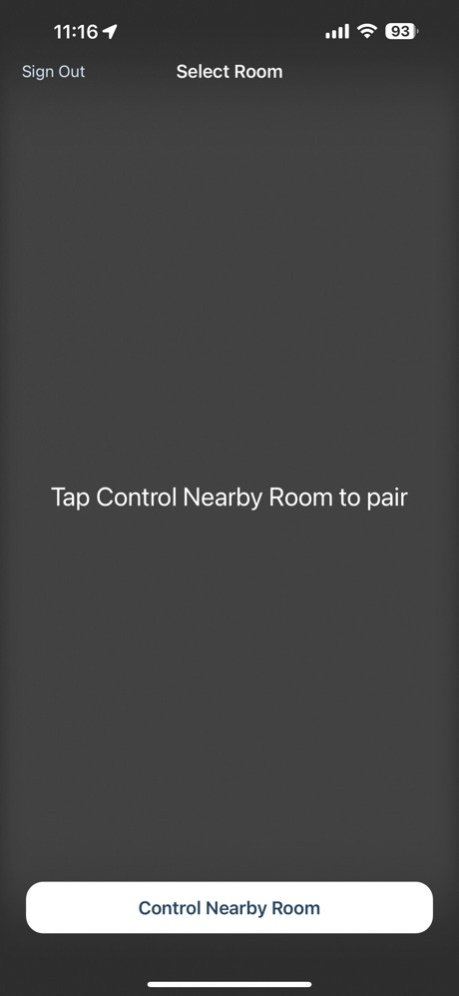
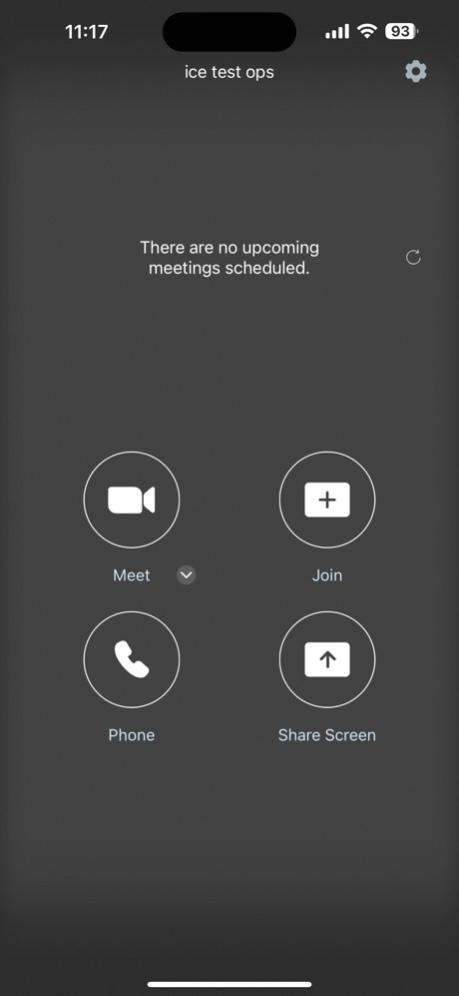

RingCentral Meetings Rooms is the “Every Room” video conferencing solution. RingCentral is extending cloud-based RingCentral Meetings capabilities to enterprise conference rooms with RingCentral Meetings Rooms.
RingCentral Meetings Rooms is a next-generation cloud-based video conference room solution without the expensive proprietary hardware needed with traditional video conference room systems. It is easy to configure with off-the-shelf equipment and delivers HD video, audio, and web conferencing capabilities. The best part is that the solution is extremely easy to use.
Easy setup
• No proprietary hardware needed – only an iPad, camera, speakers and Mac/Win connected to TV screens
• Participants can join from mobile, tablet, desktop, telephone, and RingCentral Meetings Rooms
• One tap to start or join a video conference
• Exchange or Google Calendar integration for scheduling
Amazing multiscreen video, screen sharing, touch controls
• Multi-screen option shows shared content and active speaker/gallery
• Works for small, medium, and large conference rooms
• Touch meeting controls on iPad to manage meetings, adjust camera, and more
Sep 10, 2024
Version 24.3
- User interface updates
- Advanced Microsoft Teams Meetings join preference
- Support for meeting polld
- Support for meeting reactions and nonverbal feedback
- Support for focus mode
- Support for custom join webinar disclaimer
- Enhancement to local content sharing
- Idle Time-out power saving mode
- Display meeting chat on Rooms
- Displaying meeting list on controller
About RingCentral Meetings Rooms
The company that develops RingCentral Meetings Rooms is RingCentral, Inc. The latest version released by its developer is 24.3.
To install RingCentral Meetings Rooms on your iOS device, just click the green Continue To App button above to start the installation process. The app is listed on our website since 2024-09-10 and was downloaded 0 times. We have already checked if the download link is safe, however for your own protection we recommend that you scan the downloaded app with your antivirus. Your antivirus may detect the RingCentral Meetings Rooms as malware if the download link is broken.
How to install RingCentral Meetings Rooms on your iOS device:
- Click on the Continue To App button on our website. This will redirect you to the App Store.
- Once the RingCentral Meetings Rooms is shown in the iTunes listing of your iOS device, you can start its download and installation. Tap on the GET button to the right of the app to start downloading it.
- If you are not logged-in the iOS appstore app, you'll be prompted for your your Apple ID and/or password.
- After RingCentral Meetings Rooms is downloaded, you'll see an INSTALL button to the right. Tap on it to start the actual installation of the iOS app.
- Once installation is finished you can tap on the OPEN button to start it. Its icon will also be added to your device home screen.
Program Details
System requirements
Download information
Pricing
Version History
version 24.3
posted on 2024-09-10
Sep 10, 2024
Version 24.3
- User interface updates
- Advanced Microsoft Teams Meetings join preference
- Support for meeting polld
- Support for meeting reactions and nonverbal feedback
- Support for focus mode
- Support for custom join webinar disclaimer
- Enhancement to local content sharing
- Idle Time-out power saving mode
- Display meeting chat on Rooms
- Displaying meeting list on controller
version 23.4
posted on 2023-12-28
Dec 28, 2023
Version 23.4
Minor UI improvements
version 22.4
posted on 2022-12-13
Dec 13, 2022
Version 22.4
Breakout rooms management
Panelist and host controls in a webinar
In-meeting chat replies
Support for Mobile device controllers
Configuration for Microsoft Teams Direct Guest Join integration
Claim host privileges via Host Keys
Additional non-verbal feedback
Support customize recording disclaimer
version 21.3
posted on 2021-08-17
Aug 17, 2021 Version 21.3
Centralized in-meeting security controls for hosts
Support for account managed Virtual Backgrounds with Green Screen
Enhancements to meeting end/leave flow
Meeting information with numeric dial-in password
Scheduling a password protected meeting
Customizable disclaimer for recording
Meeting and webinar passwords now called Passcodes
version 20.2
posted on 2020-06-30
Jun 30, 2020 Version 20.2
- Supports OAuth 2.0 for calendar integration
- Multiple screens can be shared and viewed in a Room simultaneously
- Test the microphone in the Room to check the audio status
- View in-meeting public chat in the Room
- View who is raising hand during the meeting
- Call out to a Room System from a RingCentral Meeting Room
- Consent to being recorded confirmation
version 20.2
posted on 2020-06-30
30 Jun 2020 Version 20.2
- Supports OAuth 2.0 for calendar integration
- Multiple screens can be shared and viewed in a Room simultaneously
- Test the microphone in the Room to check the audio status
- View in-meeting public chat in the Room
- View who is raising hand during the meeting
- Call out to a Room System from a RingCentral Meeting Room
- Consent to being recorded confirmation
version 19.4
posted on 2019-12-12
Dec 12, 2019 Version 19.4
1. Better support for iOS 13
2. Rebranding from "RingCentral Rooms" to"RingCentral Meetings Rooms"
3. Minor bug fixes
version 4.1.2
posted on 2016-06-06
version 20.2
posted on 1970-01-01
2020年6月30日 Version 20.2
- Supports OAuth 2.0 for calendar integration
- Multiple screens can be shared and viewed in a Room simultaneously
- Test the microphone in the Room to check the audio status
- View in-meeting public chat in the Room
- View who is raising hand during the meeting
- Call out to a Room System from a RingCentral Meeting Room
- Consent to being recorded confirmation
version 19.4
posted on 1970-01-01
12 de dic. de 2019 Version 19.4
1. Better support for iOS 13
2. Rebranding from "RingCentral Rooms" to"RingCentral Meetings Rooms"
3. Minor bug fixes
Disclaimer
Official App Store Link
We do not host RingCentral Meetings Rooms on our servers. We did not scan it for viruses, adware, spyware or other type of malware. This app is hosted by Apple and passed their terms and conditions to be listed there. We recommend caution when installing it.
The App Store link for RingCentral Meetings Rooms is provided to you by apps112.com without any warranties, representations or guarantees of any kind, so access it at your own risk.
If you have questions regarding this particular app contact the publisher directly. For questions about the functionalities of apps112.com contact us.
